

§ 00Talk to AI · A guided tour
Talk to AI,
out loud, in real time.
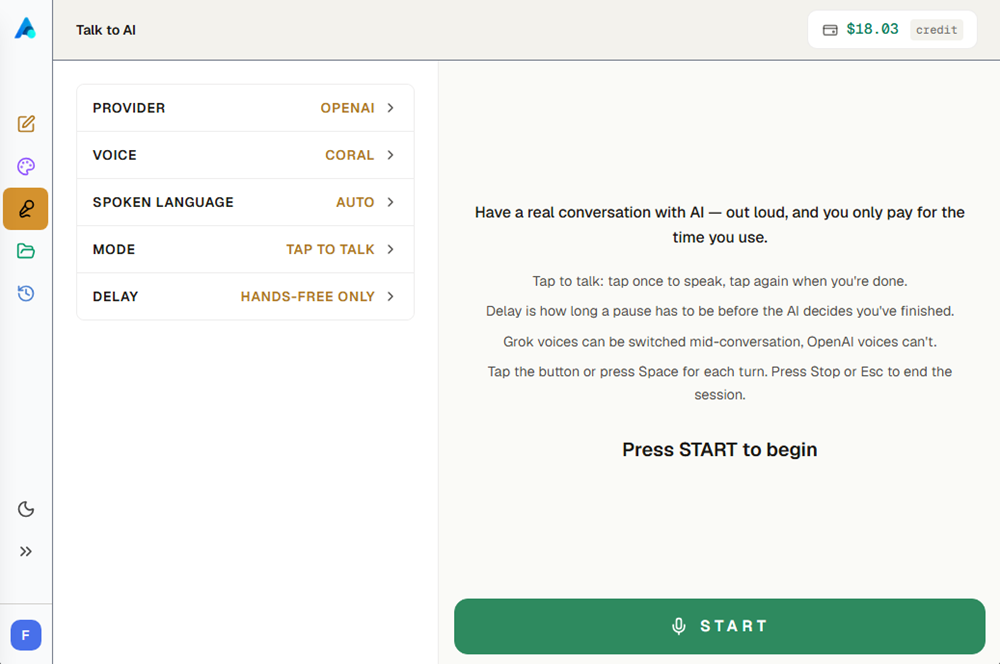
Hold a spoken conversation with AI in real time. Pick a provider, a voice and a language, then talk — the cost updates while you go.
§ 01Before you start
Set it up, then press START.
- ProviderGrok or OpenAI. Chosen before the session; it can't be swapped once you're connected.
- VoiceEach provider has its own set. Grok voices can be switched mid-conversation; OpenAI's are fixed for the session.
- Spoken languageAuto follows what you speak, or pin a language and the session answers in it.
- ModeHands-free, or tap to talk.
- DelayHands-free only: how long a pause has to be before the AI decides you've finished.
§ 02In a session
Talking, and interrupting.
- Tap to talkTap once to speak, tap again when you're done. Space does the same thing.
- Hands-freeNo tapping — it takes your pause as the end of your turn, using the Delay you set.
- Cutting inYou can start talking while it's still speaking.
- Ending itStop, or Esc.
§ 03What it costs
Per minute, shown as you go.
- Funded onlyTalk to AI needs a funded balance of at least $0.10. The free trial doesn't cover it — START stays disabled until you top up.
- Live costThe running cost sits beside the timer and updates while you talk.
- Session lengthUp to five minutes, or less if your balance won't stretch that far — the limit is set from your balance when the session starts.
- InactivityA session that goes quiet ends on its own.
§ 04After the session
Sessions are saved.
- In HistoryVoice conversations appear in History with a VOICE badge, alongside your chats.
- Continue oneOpening a saved conversation and pressing START picks it up where it stopped.
- Start freshNew conversation clears the transcript without deleting the saved one.